---
title: Stripe
---
Stripe is the default payment gateway for Statamic Resrv. In this page, we'll go over the setup required for Stripe to work correctly.
:::warning
Even though Stripe is thoroughly tested with Resrv, it's suggested that you test the payment gateway in test mode before going live.
:::
## Stripe account
Obviously, you need to create a Stripe account. You'll need your private key and the public key, and access to your account to create a webhook.
## Including Stripe's Javascript [#including-stripe-s-javascript]
You'll need to include Stripe's Javascript in your layout page:
```antlers {18}
{{ title ?? site:name }}
{{ vite src="resources/js/site.js|resources/css/site.css" }}
{{ livewire:styles }}
{{ template_content }}
{{ livewire:scripts }}
```
If you use [manual reservations](/manual-reservations), your [payment page](/payment-page) shows the same Stripe form, so its layout needs the same Stripe, Livewire and Resrv assets.
## Adding your keys to .env
For security reasons, your Stripe keys are not stored in the addon's configuration but are instead stored in your `.env` file. You need to add the following keys to your `.env` file:
```dotenv
RESRV_STRIPE_PUBLISHABLE=pk_live_.....
RESRV_STRIPE_SECRET=sk_live_.....
```
In case you have cached your config, remember to clear the config cache when making changes to the .env file:
```bash
php artisan config:clear
```
### Per-collection Stripe accounts [#per-collection-stripe-accounts]
To charge different collections through different Stripe accounts, set each key to an array keyed by collection handle. Resrv picks the one for the reserved entry's collection:
```php
// config/resrv-config.php
'stripe_publishable_key' => [
'hotels' => env('RESRV_STRIPE_PUBLISHABLE_HOTELS', ''),
'rentals' => env('RESRV_STRIPE_PUBLISHABLE_RENTALS', ''),
],
'stripe_secret_key' => [
'hotels' => env('RESRV_STRIPE_SECRET_HOTELS', ''),
'rentals' => env('RESRV_STRIPE_SECRET_RENTALS', ''),
],
'stripe_webhook_secret' => [
'hotels' => env('RESRV_STRIPE_WEBHOOK_SECRET_HOTELS', ''),
'rentals' => env('RESRV_STRIPE_WEBHOOK_SECRET_RENTALS', ''),
],
```
A key left as a plain string applies to every collection.
## Setup the webhook
In order to receive payment information from Stripe, you need to set up a webhook. You can do this in the Stripe dashboard under the "Developers" section. Select the "Webhooks" tab and click on "Add endpoint".
At the endpoint URL, you need to enter the URL of your site, followed by `/resrv/api/webhook`. So if your site is https://resrv.dev, the endpoint URL should be `https://resrv.dev/resrv/api/webhook`. Please note that HTTPS is required.
:::info[Running multiple gateways?]
With more than one gateway under `payment_gateways`, the bare `/resrv/api/webhook` URL returns a 404. Use `https://resrv.dev/resrv/api/webhook/stripe` instead. See [Payment gateways](/payment-gateways).
:::
At the "Select events to listen to" section, you need to select the following events:
- payment_intent.canceled
- payment_intent.payment_failed
- payment_intent.succeeded
After you've successfully saved your webhook, click on "Reveal" under the "Signing secret" section:
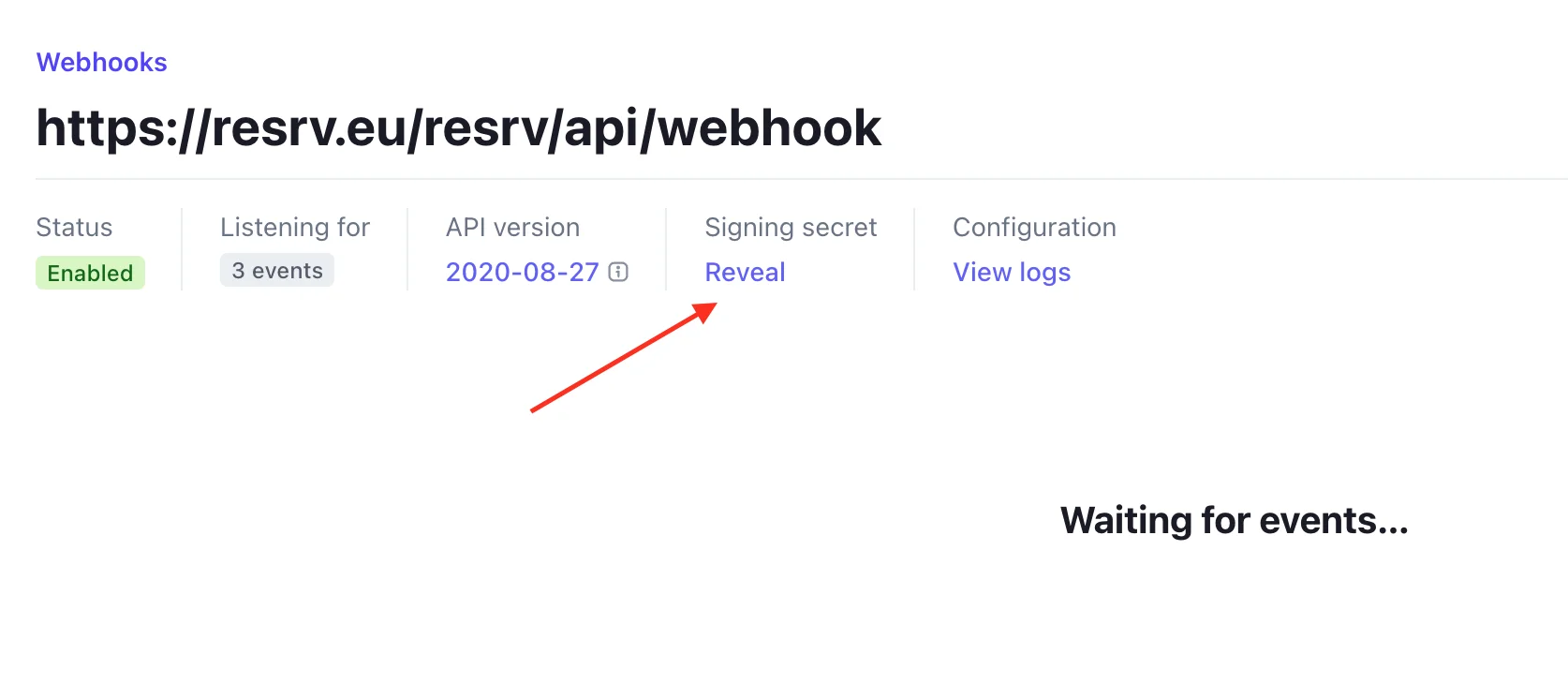
Where to find the webhook secret.
Copy the webhook secret and add it to your .env file as well:
```dotenv
RESRV_STRIPE_WEBHOOK_SECRET=whsec_.....
```
:::info[Webhook hardening]
In v6, webhooks signed against an empty secret are rejected, and a reservation is only confirmed when the amount received matches the booking amount plus any surcharge. Payments that can't be matched to a reservation trigger an orphaned payment email to your admins. From v6.5.0 that includes payments that arrive after the reservation was cancelled. From v6.6.0, a payment on a booking that another payment or **Mark as paid** already confirmed sends "Possible duplicate payment" (see [The orphan-payment race](/custom-payment-gateway#the-orphan-payment-race)).
:::
From v6.5.0 the same webhook and events also confirm payments from the [payment page](/payment-page) of a [manual reservation](/manual-reservations). Without a working webhook, those reservations stay **Awaiting payment** after the customer pays. If a card payment fails or is cancelled, the customer can try again from the same link.
## Next steps
That's it! You should now be able to receive payments from Stripe. Again, it's suggested that you test the payment gateway in test mode before going live.
To offer other gateways or add surcharges, see [Payment gateways](/payment-gateways).